1. On the top right hand corner of your browser, click the 3 dots
2. Click 'Translate...' from the list of options
3. A Google Translate menu will appear with default language options - click on one to translate the page
4. If you do not see your language in the list, click the 3 dots in the Google Translate menu and select 'Choose another language'
5. Open the dropdown and select your language
Translate This Page
1. Right click the page and select the option labeled 'Translate to...'
2. If the default language is not correct, click the language icon in the URL bar
3. Open the dropdown and select your language from the list
Translate This Page
1. On the top right hand corner of your screen, click the burger menu icon (3 horizontal lines)
2. Click 'Translate page...' from the list of options
3. In the 'Translate to' dropdown, select your language
Translate This Page
1. Click the language icon on the right hand side of your URL bar at the top of the page
2. From the list of available options, select your language
Fallback
Dịch trang này
1. Ở góc trên cùng bên phải của trình duyệt, nhấp vào dấu 3 chấm
2. Nhấp vào 'Dịch...' từ danh sách các tùy chọn
3. Menu Google Dịch sẽ xuất hiện với các tùy chọn ngôn ngữ mặc định - nhấp vào một tùy chọn để dịch trang
4. Nếu bạn không thấy ngôn ngữ của mình trong danh sách, hãy nhấp vào dấu 3 chấm trong menu Google Dịch và chọn 'Chọn ngôn ngữ khác'5
. Mở menu thả xuống và chọn ngôn ngữ của bạn
Dịch trang này
1. Nhấp chuột phải vào trang và chọn tùy chọn có nhãn 'Dịch sang...'
2. Nếu ngôn ngữ mặc định không chính xác, hãy nhấp vào biểu tượng ngôn ngữ trong thanh
URL 3. Mở menu thả xuống và chọn ngôn ngữ của bạn từ danh sách
Dịch trang này
1. Ở góc trên cùng bên phải màn hình của bạn, nhấp vào biểu tượng menu bánh mì kẹp thịt (3 đường ngang)
2. Nhấp vào 'Dịch trang...' từ danh sách các tùy chọn
3. Trong menu thả xuống "Dịch sang", hãy chọn ngôn ngữ của bạn
Dịch trang này
1. Nhấp vào biểu tượng ngôn ngữ ở phía bên tay phải của thanh URL ở đầu trang
2. Từ danh sách các tùy chọn có sẵn, hãy chọn ngôn ngữ của bạn
Dự phòng
이 페이지를 번역하세요
1. 브라우저 오른쪽 상단에서 점 3개를 클릭하세요.
2. 옵션 목록에서 '번역...'을 클릭하세요.
3. 기본 언어 옵션이 포함된 Google 번역 메뉴가 나타납니다. 해당 메뉴를 클릭하면 페이지가 번역됩니다.
4. 목록에 원하는 언어가 표시되지 않으면 Google 번역 메뉴에서 점 3개를 클릭하고 '다른 언어 선택'을 선택하세요.
5. 드롭다운을 열고 언어를 선택하세요.
이 페이지를 번역하세요
1. 페이지를 마우스 오른쪽 버튼으로 클릭하고 '번역...' 옵션을 선택하세요.
2. 기본 언어가 올바르지 않은 경우, URL 표시줄의 언어 아이콘을 클릭하세요.
3. 드롭다운을 열고 목록에서 언어를 선택하세요.
이 페이지를 번역하세요
1. 화면 오른쪽 상단에서 버거 메뉴 아이콘(가로선 3개)을 클릭합니다.
2. 옵션 목록에서 '페이지 번역...'을 클릭하세요.
3. '번역 대상' 드롭다운에서 언어를 선택하세요.
이 페이지를 번역하세요
1. 페이지 상단의 URL 표시줄 오른쪽에 있는 언어 아이콘을 클릭하세요.
2. 사용 가능한 옵션 목록에서 언어를 선택하세요.
이 페이지를 번역하세요
1. 브라우저 오른쪽 상단에서 점 3개를 클릭하세요.
2. 옵션 목록에서 '번역...'을 클릭하세요.
3. 기본 언어 옵션이 포함된 Google 번역 메뉴가 나타납니다. 해당 메뉴를 클릭하면 페이지가 번역됩니다.
4. 목록에 원하는 언어가 표시되지 않으면 Google 번역 메뉴에서 점 3개를 클릭하고 '다른 언어 선택'을 선택하세요.
5. 드롭다운을 열고 언어를 선택하세요.
Isalin ang Pahinang Ito
1. Sa kanang sulok sa itaas ng iyong browser, i-click ang 3 tuldok
2. I-click ang 'Isalin...' mula sa listahan ng mga opsyon
3. Lilitaw ang isang menu ng Google Translate na may mga default na pagpipilian sa wika - mag-click sa isa upang isalin ang pahina
4. Kung hindi mo nakikita ang iyong wika sa listahan, i-click ang 3 tuldok sa menu ng Google Translate at piliin ang 'Pumili ng ibang wika'
5. Buksan ang dropdown at piliin ang iyong wika
Isalin ang Pahinang Ito
1. I-right click ang pahina at piliin ang opsyong may label na 'Isalin sa...'
2. Kung hindi tama ang default na wika, i-click ang icon ng wika sa URL bar
3. Buksan ang dropdown at piliin ang iyong wika mula sa listahan
Isalin ang Pahinang Ito
1. Sa kanang sulok sa itaas ng iyong screen, i-click ang icon ng menu ng burger (3 pahalang na linya)
2. I-click ang 'Isalin ang pahina...' mula sa listahan ng mga opsyon
3. Sa dropdown na 'Isalin sa', piliin ang iyong wika
Isalin ang Pahinang Ito
1. I-click ang icon ng wika sa kanang bahagi ng iyong URL bar sa tuktok ng pahina
2. Mula sa listahan ng mga magagamit na opsyon, piliin ang iyong wika
Isalin ang Pahinang Ito
1. Sa kanang sulok sa itaas ng iyong browser, i-click ang 3 tuldok
2. I-click ang 'Isalin...' mula sa listahan ng mga opsyon
3. Lilitaw ang isang menu ng Google Translate na may mga default na pagpipilian sa wika - mag-click sa isa upang isalin ang pahina
4. Kung hindi mo nakikita ang iyong wika sa listahan, i-click ang 3 tuldok sa menu ng Google Translate at piliin ang 'Pumili ng ibang wika'
5. Buksan ang dropdown at piliin ang iyong wika
បកប្រែទំព័រនេះ។
1. នៅជ្រុងខាងស្តាំដៃនៃកម្មវិធីរុករករបស់អ្នក ចុចលើចំណុច 3
2. ចុច 'បកប្រែ...' ពីបញ្ជីជម្រើស
3. ម៉ឺនុយបកប្រែ Google នឹងបង្ហាញជាមួយជម្រើសភាសាលំនាំដើម - ចុចលើមួយដើម្បីបកប្រែទំព័រ
4. ប្រសិនបើអ្នកមិនឃើញភាសារបស់អ្នកនៅក្នុងបញ្ជីទេ សូមចុចចំនុច 3 នៅក្នុងម៉ឺនុយ Google Translate ហើយជ្រើសរើស 'Choose other language'
5. បើកបញ្ជីទម្លាក់ចុះ ហើយជ្រើសរើសភាសារបស់អ្នក។
1. នៅជ្រុងខាងស្តាំដៃនៃកម្មវិធីរុករករបស់អ្នក ចុចលើចំណុច 3
2. ចុច 'បកប្រែ...' ពីបញ្ជីជម្រើស
3. ម៉ឺនុយបកប្រែ Google នឹងបង្ហាញជាមួយជម្រើសភាសាលំនាំដើម - ចុចលើមួយដើម្បីបកប្រែទំព័រ
4. ប្រសិនបើអ្នកមិនឃើញភាសារបស់អ្នកនៅក្នុងបញ្ជីទេ សូមចុចចំនុច 3 នៅក្នុងម៉ឺនុយ Google Translate ហើយជ្រើសរើស 'Choose other language'
5. បើកបញ្ជីទម្លាក់ចុះ ហើយជ្រើសរើសភាសារបស់អ្នក។
ترجمة هذه الصفحة
1. في الزاوية اليمنى العليا من المتصفح، انقر فوق النقاط الثلاث
2. انقر فوق "ترجمة..." من قائمة الخيارات
3. ستظهر قائمة ترجمة Google مع خيارات اللغة الافتراضية - انقر فوق أحدها لترجمة الصفحة
4. إذا كنت لا ترى لغتك في القائمة، فانقر على النقاط الثلاث في قائمة ترجمة Google وحدد "اختيار لغة أخرى"
5. افتح القائمة المنسدلة وحدد لغتك
ترجمة هذه الصفحة
1. انقر بزر الماوس الأيمن على الصفحة وحدد الخيار المسمى "ترجمة إلى..."
2. إذا كانت اللغة الافتراضية غير صحيحة، فانقر فوق رمز اللغة في شريط URL
3. افتح القائمة المنسدلة وحدد لغتك من القائمة
ترجمة هذه الصفحة
1. في الزاوية اليمنى العليا من شاشتك، انقر فوق أيقونة قائمة البرجر (3 خطوط أفقية)
2. انقر فوق "ترجمة الصفحة..." من قائمة الخيارات
3. في القائمة المنسدلة "ترجمة إلى"، حدد لغتك
ترجمة هذه الصفحة
1. انقر فوق رمز اللغة الموجود على الجانب الأيمن من شريط URL الخاص بك أعلى الصفحة
2. من قائمة الخيارات المتاحة، حدد لغتك
ترجمه این صفحه
1. در گوشه سمت راست بالای مرورگر خود، روی 3 نقطه کلیک کنید
2. از لیست گزینه ها روی "Translate..." کلیک کنید
3. منوی Google Translate با گزینه های زبان پیش فرض ظاهر می شود - برای ترجمه صفحه روی یکی کلیک کنید
4. اگر زبان خود را در لیست نمیبینید، روی 3 نقطه در منوی Google Translate کلیک کنید و «انتخاب زبان دیگری» را انتخاب کنید.
5. منوی کشویی را باز کنید و زبان خود را انتخاب کنید
ترجمه این صفحه
1. روی صفحه کلیک راست کرده و گزینه با عنوان "Translate to..." را انتخاب کنید.
2. اگر زبان پیش فرض درست نیست، روی نماد زبان در نوار URL کلیک کنید
3. منوی کشویی را باز کنید و زبان خود را از لیست انتخاب کنی
ترجمه این صفحه
1. در گوشه سمت راست بالای صفحه، روی نماد منوی همبرگر (3 خط افقی) کلیک کنید.
2. از لیست گزینه ها روی "ترجمه صفحه..." کلیک کنید
3. در منوی بازشوی «ترجمه به»، زبان خود را انتخاب کنید
ترجمه این صفحه
1. روی نماد زبان در سمت راست نوار URL خود در بالای صفحه کلیک کنید
2. از لیست گزینه های موجود، زبان خود را انتخاب کنید
بازگشت به عقب
Skipped to main content
Mark and Ingeus UK
Mark achieves his work goal
Ask Mark what it’s like to have a job again after four years out of work and his one word answer says it all: ‘Brilliant’, beams the 54 year-old from Barrow-in-Furness.
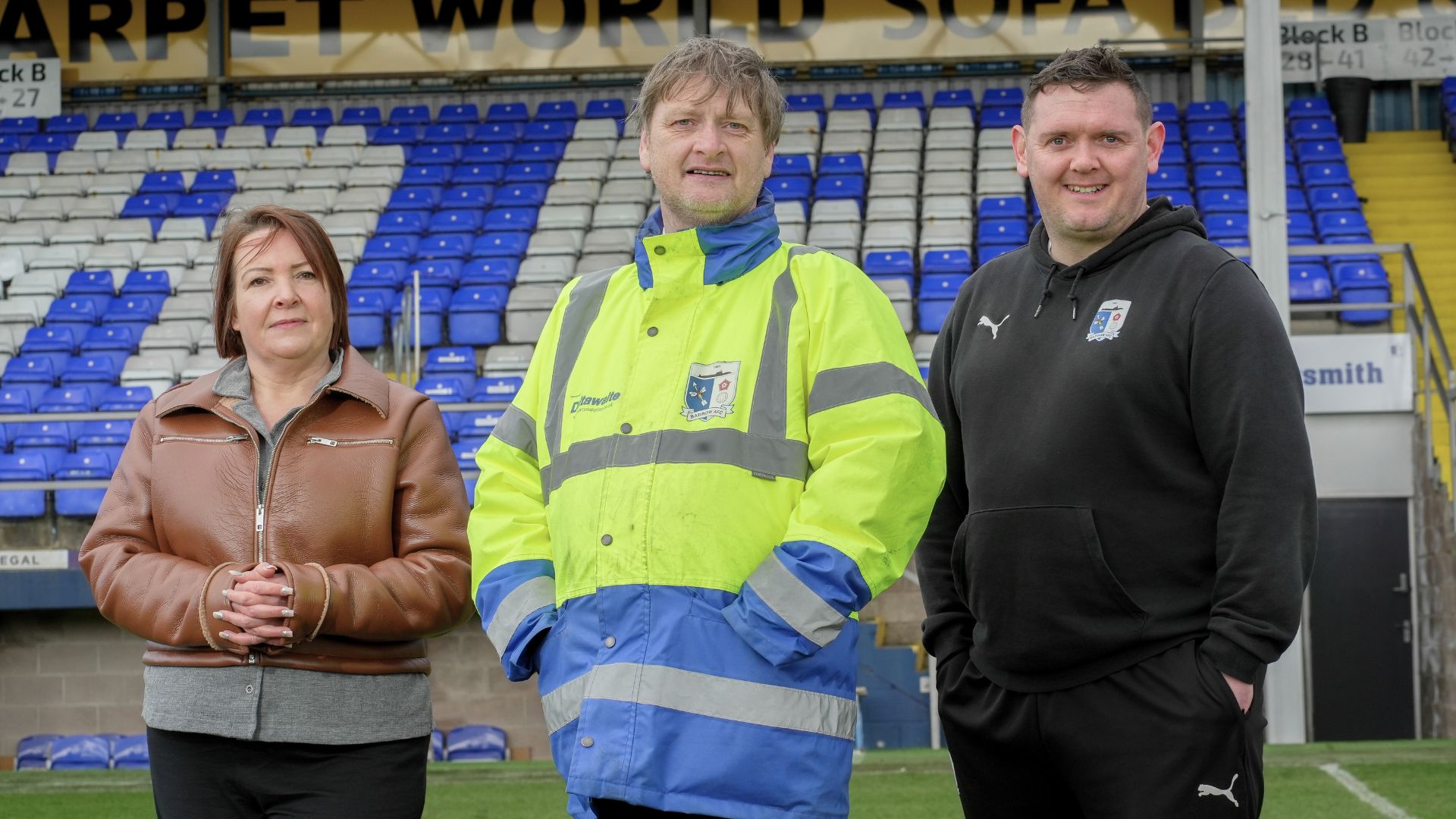
Now competently assisting crowds of Bluebirds as a match day steward at Barrow Association Football Club, his career has been kickstarted again thanks to the Work and Health Programme: Pioneer, delivered by Ingeus in the UK.
The 15-month programme gives all-round health, employability, and practical support to people with health conditions and disabilities, and those out of work for a significant time.
Working closely with local employers, Ingeus supports people to master their roles while working, with a focus on in-work training, encouragement, and practical problem solving.
Despite undertaking voluntary work, Mark struggled to find paid employment due to an incomplete CV and mounting anxiety about his situation.
With hearing issues, past epilepsy, and insecure housing, his confidence had taken a severe knock.
Yet determinedly persevering, Mark attended a local job fair and his fortunes changed when he met ‘a lovely lady called Katherine,’ an Ingeus employment specialist.
Mark joined the Pioneer programme in July 2024 and Katherine began updating his CV and planning his pathway back to work.
He also received support from the in-house Ingeus health team, working on his anxiety and attending confidence and motivation workshops.
After assessing Mark’s career interests, practising interview techniques, and signposting Mark for housing advice, Katherine began contacting employers with security vacancies and quickly lined up a stewarding work trial at Barrow AFC.
Recognising his enthusiasm and people skills, Mark was offered a paid role just three months after joining Pioneer.
He can walk to the Holker Street stadium from his home and works every match day. Pioneer has funded his SIA (Security Industry Authority) Level 3 and he’s undertaken safeguarding and pyrotechnics training at the club.
With his past epilepsy well managed, Ingeus has also supported Mark in applying for a driving licence.
Katherine continues to support Mark with regular face-to-face appointments. She is helping him apply for additional security roles, with further event security work already lined up for the summer.
“My favourite thing about the job is meeting new people, helping other people,” says Mark.
“I help to look after the spectators, the crowds, the grounds. I’ve got skills, so I’m now an officially licensed security officer. I’ve got stewarding skills, crowd control skills, conflict management skills, all through this programme.
“I’m not so bored in the house now. I like getting paid and praised for a well-earned job.”
Mark is the third Pioneer participant to join Barrow AFC, which has worked with Ingeus for the past year.
Rickie Wallbank, Ground Safety Officer and Stadium Manager, has fostered the relationship and says: “The Pioneer programme has helped me and us as a football club massively in hiring and recruitment. When Mark came along he was a good fit, he was a good communicator and was keen to progress with his continuous working development.
“Three people have joined us in the last 12 months and each one has been a credit to themselves.
“They’re staff that we will retain for a long time. It’s really good to work alongside Pioneer participants - I’ve got no hesitation in saying other businesses should do exactly the same.”
We use cookies to ensure you get the best experience. Please choose the cookie level that's appropriate for you. We recommend allowing all cookies to ensure you get the most out of our website. Cookie Policy.